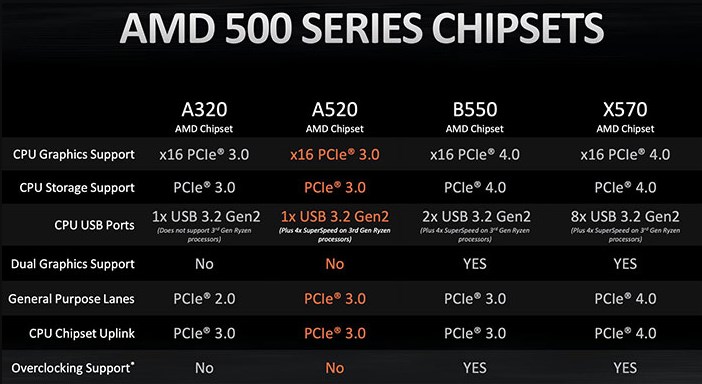
Many owners of motherboards with AMD 500 series chipsets regularly complain about USB disconnection, which can cause keyboards, peripherals, storage devices, or VR headsets to lose contact with the PC.
The VR headset paired with a powerful graphics card equipped with the PCI-E4.0 interface has been proven to be an easy way to recreate the problem. Specific options such as switching to PCI-E3.0 mode or disabling C-states in UEFI do not resolve the failure, but do reduce the frequency of its occurrence.
AMD acknowledges this problem and asks users to collect statistics for an early solution in the future.
Since that response doesn't give really give us any immediate guidance as to what to do for now, here's are some remedies that you might want to try if you're currently experiencing USB 2.0 disconnect issues:
- Set PCIe to Gen 3 in the BIOS
- Update to the latest BIOS with newest AGESA available for your motherboard
- Install the latest AMD chipset drivers
- After installing latest chipset drivers and running Windows Update, some users have reported manually removing / uninstalling USB ports and root hubs in Device Manger, re-booting, and letting the ports get redetected has helped.


